Generating images with a 2025 Android
29 June 2026
Here is an image we generated entirely on a Samsung Galaxy S25+ – PrismML's Bonsai Image model again, this time with the diffusion transformer running on the phone's Hexagon NPU:
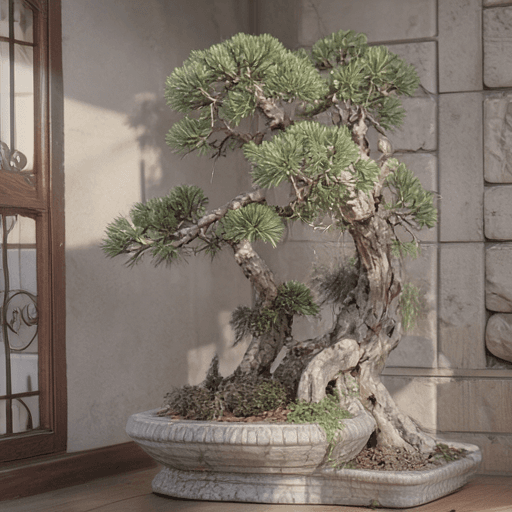
The code is at github.com/duration-ai/bonsai-image-android. This is the companion to Generating images with a 2020 iPhone – same model, same 512×512 but Android this time. We closed that last post by saying we might have a look at Android next. We did, and it turned out to be much harder.
For iOS, Apple gives you two mature machine-learning stacks (Core ML and MLX), and PrismML's reference happened to run on the same MLX framework as our Swift port, so we could check our numbers against theirs line by line.
Annoyingly, there aren't any mature equivalents for Android – NNAPI has been replaced by LiteRT (formerly TensorFlow Lite), but it's still fairly immature. The trouble is that different Android phone families have different hardware, so for maximum performance you have to choose how and where to run a given model: the CPU, the GPU, or, on some phones, the NPU. Each family has its own toolchain, none of them as smooth as Core ML.
The baseline for our porting work is the CPU: stable-diffusion.cpp – or rather Juste-Leo2's fork of it, which adds the 1-bit support – runs the Bonsai weights pretty straightforwardly, though very slowly. On the S25+'s Snapdragon 8 Elite the diffusion transformer takes about 2 minutes per step, so a full 512×512 image takes 8–9 minutes. This is fine, but given that we got the iPhone 12 Pro from 2020 running a 512×512 generation in a little over 2 minutes, we wanted to see if we could do any better on a phone that should be five whole years ahead technologically.
We had some early success with the GPU, managing to generate a crisp apple at 256×256:
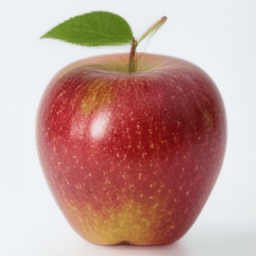
But efforts to push the GPU to generate a 512×512 image then stalled badly, with consistent crashing during denoising, which left us with only the NPU as the untested path. (Someone more knowledgeable may be able to unblock this, I'm sure.)
Getting Bonsai onto the S25+'s NPU meant working around many things that weren't a problem on iOS: weights that had to be expanded for the NPU, fp16 overflows, and Qualcomm SDK version quirks, to name a few.
We ended up parking the port before we had a fully tappable app – we kept hitting fresh problems getting the app itself to talk to the NPU. The final artefact is a generation pipeline that we load onto the phone and trigger from a computer over a cable.
Here are four more generations, from the same prompts we ran on the iPhone:

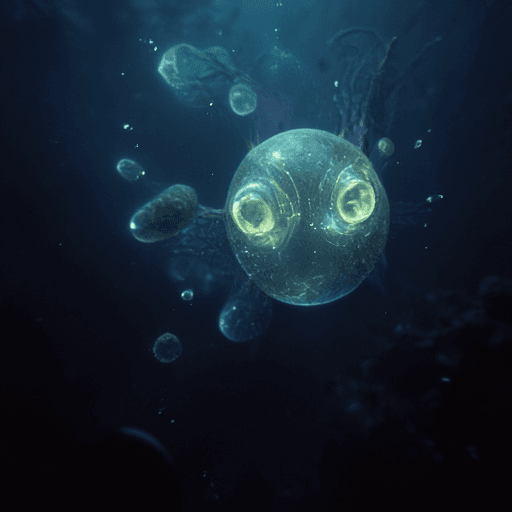


Each 512×512 image takes a little over 2 minutes – roughly 20 seconds to encode the prompt, 65 seconds on the NPU for the four denoising steps, and 45 seconds to decode. Only on the NPU did we manage to both complete a 512×512 render and do it in a reasonable time. In wall-clock time, it's also almost exactly what the six-year-old iPhone managed on its GPU – about 140 seconds, at the same four steps.
The images do come out a bit softer than the iPhone's, though. It's the same model, but the precision differs. The iPhone runs the whole transformer on its GPU in floating point; the NPU runs much of it in fp16 too, but some of the blocks had to fall back to lower-precision integers (those fp16 overflows) which we suspect ends up blunting the fine detail.
Because the 1-bit model is no longer 1-bit once it has been expanded for the NPU, the whole deployable bundle comes to about 10.7 GB, against 3.7 GB on the iPhone. Peak memory sits near 5 GB, comfortable on a 12 GB phone but well above the iPhone's careful 3 GB.
As on the iPhone, we run into thermal throttling when doing back-to-back generations. We also have not yet attempted to move the text encoder or the VAE off the CPU – these might be future wins.
Although we didn't manage to get all the way through to a shippable Android app for Bonsai image generation, we're happy with the progress we made. Hopefully this is at least a useful starting point for others who might be interested in taking up the mantle.